











Skip to content
Shopify BrandBastion x Zendesk Integration

Turn relevant social conversations into Zendesk tickets

 BrandBastion identifies the comments, mentions, and DMs that need customer support and sends only those interactions to Zendesk. Your agents can manage each issue from their existing queue, while BrandBastion keeps the Zendesk ticket and social conversation connected. 
zendesk-header
Trusted by Fortune 1,000 & fast-growing DTC brands
netflixlogo-1 tnf supercell redbulllogo-1 calvinklein uberlogo-2 narslogo sephoralogo mindvalley-Feb-23-2024-06-12-20-2174-PM purduelogo-1 Grubhub-Logo-size WorldRemit_Identity_2020_RGB_72ppi

Bring social customer care into Zendesk, without the noise

Create tickets only when support is needed  Use BrandBastion’s tags and workflows to turn relevant social conversations into Zendesk tickets automatically.   
Give agents the full conversation context  Include the original message, conversation history, social profile, and relevant customer information with every ticket.   
Keep Zendesk and BrandBastion in sync

Synchronize replies, ticket details, priorities, statuses, and internal notes across both platforms.

 
Relevant case routing

Route the right social issues into Zendesk

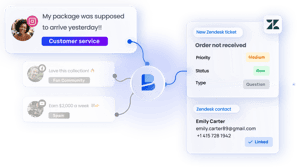
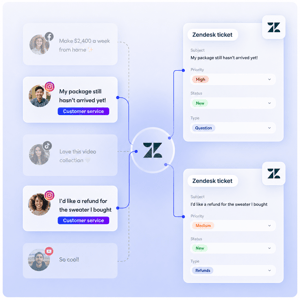
Social channels generate thousands of interactions, but only a small percentage require support. BrandBastion identifies those conversations and automatically creates Zendesk tickets for the issues your agents need to handle.

  • Escalate complaints, order issues, product questions, and support requests
  • Exclude spam, reactions, and general social engagement
  • Use BrandBastion tags and filters to control ticket creation
  • Route different issue types through the appropriate support workflows
routing1-1
Connected customer records

Connect social users to Zendesk customers

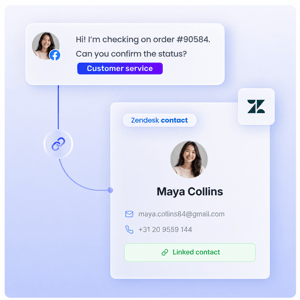
Link social profiles to existing Zendesk users directly from BrandBastion, giving agents more customer context and ensuring future conversations remain connected to the correct record.

  • Link social profiles to existing Zendesk users
  • Create a new Zendesk user when no record exists
  • Keep the customer and social conversation connected
  • View relevant Zendesk ticket information in BrandBastion
userlinking
Connected teams

Keep social and CX teams working in sync

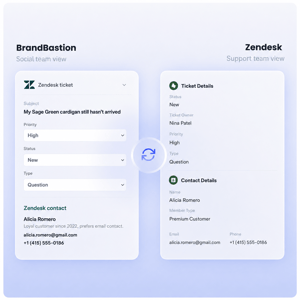
BrandBastion connects the social conversation with the Zendesk ticket, so both teams have visibility into what is happening and can collaborate without losing context.
  • Keep ticket status, priority, replies, and internal notes synchronized
  • Give social teams visibility into CX progress from BrandBastion
  • Let CX agents manage and reply to relevant conversations from Zendesk
  • Ensure both teams are working from the same customer context
ticket

FAQs

How are Zendesk tickets created?

Your BrandBastion CSM works with your team to define which types of social conversations should create Zendesk tickets, then configures the relevant classifications, tags, and filters. Workflows can be refined over time as your needs change. 

What stays synchronized between BrandBastion and Zendesk?

Supported case details, including status, priority, and internal notes, remain visible across both platforms. Replies sent from Zendesk are also published to the original social conversation and reflected in BrandBastion.


Can different issues be routed to different Zendesk queues?

Yes. BrandBastion can create cases with specific keywords in the title (e.g. per platform, per message type, per social profile), which your Zendesk routing rules can then use to assign each case to the appropriate queue.

What is required to set up the integration? After the integration is enabled, you connect your Zendesk account and work with your CSM to configure and test your case creation workflows. The rules can then be reviewed periodically to improve routing efficiency.

Get started with BrandBastion

Typology_logo-white
"BrandBastion has become a core asset for Typology. It helped us improve customer service and engagement, enhancing the delivery of the most accurate and swift customer experiences. The AI functionalities helped scale our operations internationally and contributed to a noteworthy growth in positive sentiment. "
ana-webanck-typology Ana Webanck - Head of International & Special Operations d